In my previous article, I have written about how to run Renovate with SystemD as Quadlet. I will use this unit file to run Renovate: Renovate with Podman Quadlet.
Why are you doing it?
That is a good question, we already have podman auto-update command to update
everything.
Although, it can be useful in some situations.
For example, same service is distributed across more machines and want to update
everything at same time. Or it can be done for better version control with
Quadlet files.
And it is fun to tinker with things! 😃
What is the plan?
I have a repository that hold some file:
├── quadlet      # Directory hold the Quadlet files
│   ├── blog-build.container
│   ├── blog@.container
│   ├── blog-gateway.container
│   ├── blog.pod
│   ├── blog-template.volume
│   └── blog.volume
├── README.md
├── renovate.json # Giving option for Renovate how to parse this repository
└── volume        # Static data for volumes
    └── blog-template
        └── default.conf.template
The quadlet directory contains the Quadlet related files.
From perspective of this article, the more important ones are the container ones.
For example blog-gateway.container:
[Unit]
Description=HAPorxy for web servers

[Container]
Pod=blog.pod
Image=git.thinkaboutit.tech/pandora/haproxy-for-web:3.2@sha256:ef3f8aa68a2d3b414b7fcc6c25b04da421e39f72addce08e06d7191eccd82dc9
Label=app=blog

## Environment variables
Environment=HA_BE_SRV_1="s1 127.0.0.1:8081"
Environment=HA_BE_SRV_2="s2 127.0.0.1:8082"
Environment=HA_BE_SRV_3="s3 127.0.0.1:8083"

## Other
UserNS=keep-id
What seems difference with a regular container file?
- The image has been pinned, it assigned for a specific manifest: So it does not matter when or where deployed, same image will be present.
- It does not have auto update parameter: I don’t want allow to auto update the container.
So, the plan! I want to achieve with Renovate that it would be able to watch the
images in *.container file and give updates if there are new ones!
Use regex custom manager of Renovate
Currently, Renovate does not support Quadlet out of the box. Some tinkering is
required to achieve it. The key is in renovate.json file:
{
  "$schema": "https://docs.renovatebot.com/renovate-schema.json",
  "extends": ["config:recommended"],
  "customManagers": [
    {
      "customType": "regex",
      "datasourceTemplate": "docker",
      "versioningTemplate": "docker",
      "fileMatch": [".*\\.container$"],
      "matchStrings": [
        "(?<indentation>\\n\\s*)Image\\s*=\\s*(?<depName>[a-zA-Z0-9/._-]+)(?::(?<currentValue>[a-zA-Z0-9._-]+))?(?:@(?<currentDigest>sha256:[a-f0-9]+))?"
      ],
      "matchStringsStrategy": "any",
      "autoReplaceStringTemplate": "{{{indentation}}}Image={{{depName}}}{{#if newValue}}:{{{newValue}}}{{/if}}{{#if newDigest}}@{{{newDigest}}}{{/if}}"
    }
  ]
}
In the fileMatch we can specify (in form of regex) what files we want to scan.
Because of JSON, we have to escape the \ character as \\.
So the regex for file match is: .*\.container$.
This regex filter every file that has .container extension. So in my case:
quadlet/blog-build.containerquadlet/blog@.containerquadlet/blog-gateway.container
Then the next part is to scan the file. This is done by matchStrings
parameter:
(?<indentation>\n\s*)Image\s*=\s*(?<depName>[a-zA-Z0-9/._-]+)(?::(?<currentValue>[a-zA-Z0-9._-]+))?(?:@(?<currentDigest>sha256:[a-f0-9]+))?
This regex is responsible to fetch the line from container file that looks like:
<indentation>Image=<depName>:<currentValue>@<currentDigest>.
So with the blog gateway image example:
Image=git.thinkaboutit.tech/pandora/haproxy-for-web:3.2@sha256:ef3f8aa68a2d3b414b7fcc6c25b04da421e39f72addce08e06d7191eccd82dc9
Captured as:
| Property | Value |
|---|---|
| indentation | (empty) |
| depName | git.thinkaboutit.tech/pandora/haproxy-for-web |
| currentValue | 3.2 |
| currentDigest | sha256:ef3f8aa68a2d3b414b7fcc6c25b04da421e39f72addce08e06d7191eccd82dc9 |
The autoReplaceStringTemplate tells what should be the replaces line.
This line shows that if there is newer value, then it will be replaced.
Let’s run Renovate
After I manually start the service (which is started by a SystemD timer regularly):
systemctl --user start renovate@quadlets.service
In the logs, I can see that the custom regex manager has picked up the files:
INFO: Repository started (repository=hephaestus/thinkaboutit-blog)
      "renovateVersion": "39.230.1"
INFO: Dependency extraction complete (repository=hephaestus/thinkaboutit-blog, baseBranch=main)
      "stats": {
        "managers": {"regex": {"fileCount": 3, "depCount": 3}},
        "total": {"fileCount": 3, "depCount": 3}
      }
INFO: Repository finished (repository=hephaestus/thinkaboutit-blog)
      "cloned": true,
      "durationMs": 60727
It also created the dependency dashboard which is empty, since this repository is a fresh implementation.
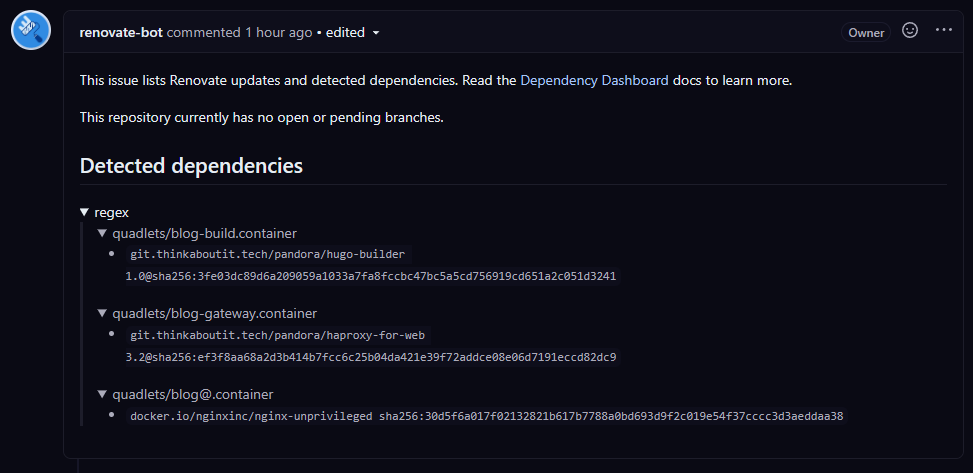
How does it fit into a pipeline?
This repository and this monitoring fits into a CI pipeline. Imagine the following sequence for CI:
- Updates are coming, detected by Renovate
- New release is made after test and merge
- Create a generic package using generic builder image
- Then this is the point where the CD can start.
But this story is part of another major story, I will speak about it later 🙂
Final words
This regex custom manager seems really a very handy thing. Not just for Quadlet
but to monitor other versions that are not on “regular place”.
For example, having a Containerfile that fetch some binary from Github
release.
With this regex custom manager, that can also be easily managed.