What is Renovate?
Renovate is an automated dependency update tool. It helps to update dependencies in your code without needing to do it manually. When Renovate runs on your repo, it looks for references to dependencies (both public and private) and, if there are newer versions available, Renovate can create pull requests to update your versions automatically.
This tool can be used within a large eco-system like in Github, Azure, etc. But in my case the most important part is the self-hosted part. In this article, I will cover the following points:
- Be able to run renovate with Podman.
- Build a quadlet to it as template, so it can be reused multiple time.
- Implement a timer to schedule it automatically.
Run Renovate with podman
🧨 Warning
Be sure to read renovate document how to setup it for your environment. This is for my environment and this article focuses for Podman part.Renovate has a short description how to run it with docker. This was my starting point.
Prepare configuration
In the container_data/renovate directory. Its content gives directives to
renovate where to monitor and which repository.
In my case, I want to monitor repositories in my self-hosted Gitea instance.
$ cat config.js
module.exports = {
  "platform": "gitea",
  "endpoint": "https://git.example.com/api/v1",
  "gitAuthor": "renovate-bot <renovate-bot@example.com>",
  "onboardingConfigFileName": "renovate.json",
  "groupName": "all",
  "repositories": [
    "PublicProjects/project1",
    "PublicProjects/project2",
  ],
};
Prepare secrets
Furthermore, we will need for two secrets:
renovate-gitea-pat: Personal Access Token for Gitea to be able to open pull request about updates.renovate-github-pat: This is needed because renovate put some release information into the pull request body. If this PAT is not provided, PR won’t contain the release information.
To create secrets in Podman, I combine it with 1Password CLI. If you don’t use it, of course a simple echo can replace it, see in my earlier post.
op read -n "op://Server/Gitea - Renovate bot/PAT" | podman secret create renovate-gitea-pat -
op read -n "op://Server/github-pat-for-renovate/password" | podman secret create renovate-gitea-pat -
Run renovate with Podman
Following command can start renovate.
$ podman run --rm \
    -v $HOME/container_data/renovate:/usr/src/app \
    --secret renovate-gitea-pat,type=env,target=RENOVATE_TOKEN \
    --secret renovate-github-pat,type=env,target=RENOVATE_GITHUB_COM_TOKEN \
    docker.io/renovate/renovate
This first create a PR that enable renovate to monitor things.
Subsequent commands can create PR like this:
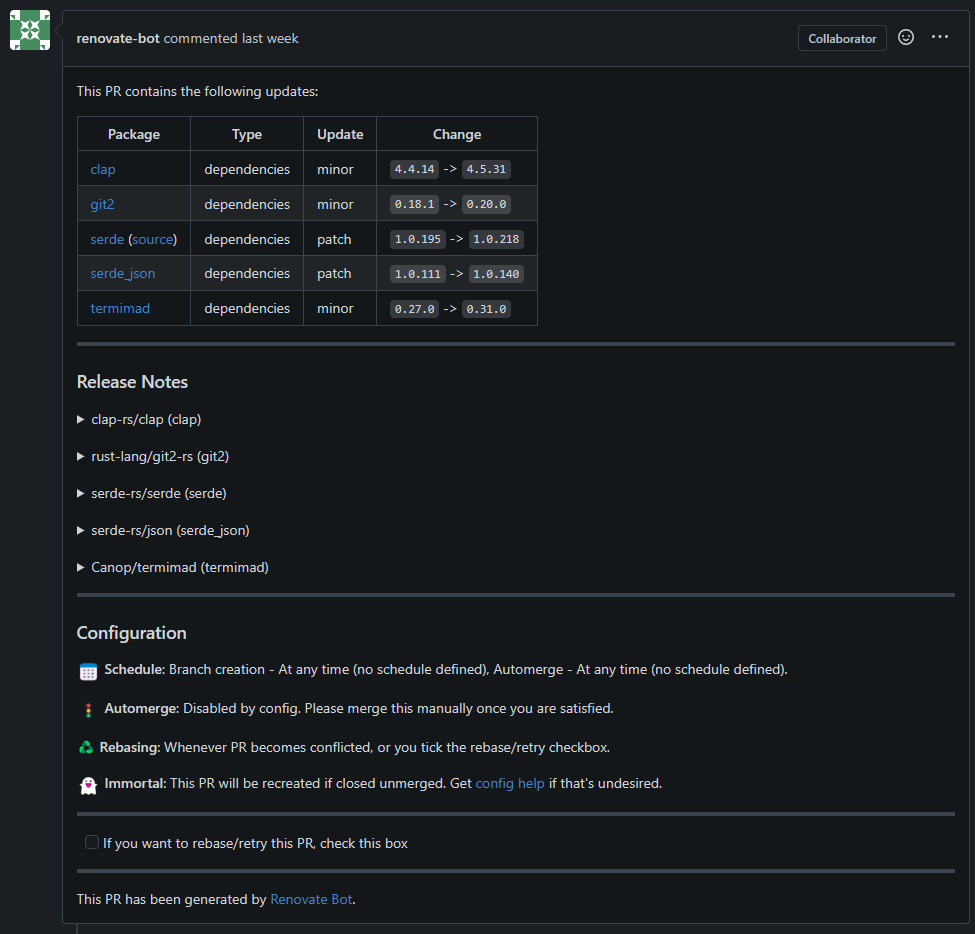
It modify files, depends what is the package manager or config file.
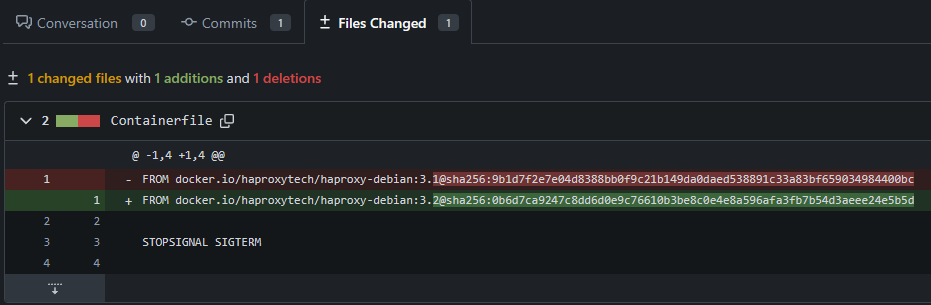
For example, it can also update non-major changes in Dockerfile/Containerfile:
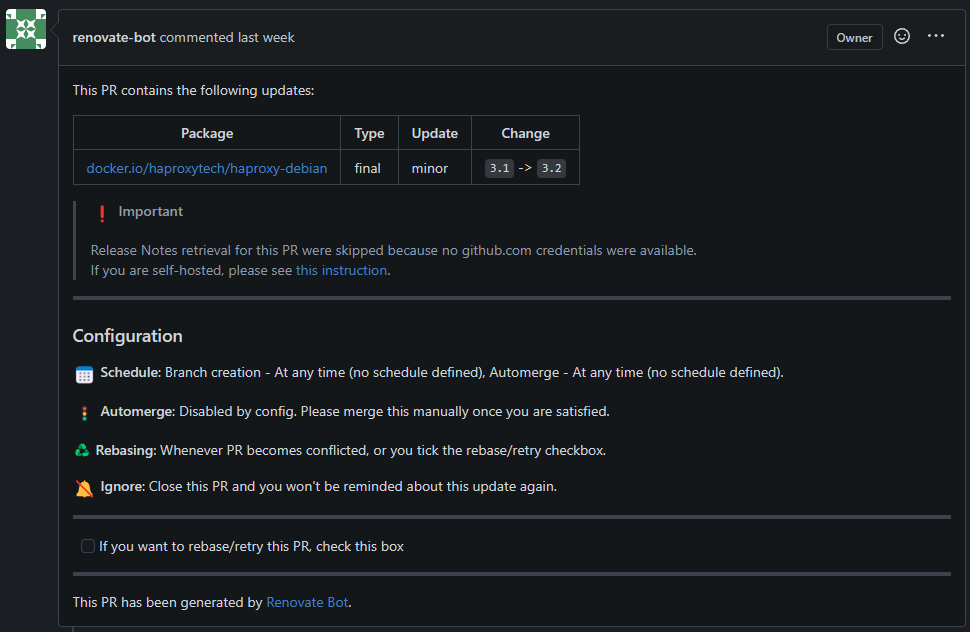
If Github token is missing (even if you open PR not to Github) it gives you a
warning that could not fetch the release documents:
Move things to systemd
I want to move this command to Quadlet. Why? Because I want to schedule it by systemd timer. Systemd timer requires to have a service to run, so it is handy just make container Quadlet. But the twist, that I would like to have multiple renovate config to run, but I don’t want to create a unit file for each configuration. The solution is to use template files.
Create a template for renovate
I have created a renovate@.container file in $HOME/.config/container/systemd
directory.
Systemd knows it is a template because it ends with ‘@’ character.
To start unit based on template is easy like systemctl --user start renovate@config1.service.
Here is how my container files looks like:
[Unit]
Description=Run renovate for any config

[Container]
Image=docker.io/renovate/renovate
AutoUpdate=registry

## Environment variables
Secret=renovate-gitea-pat,type=env,target=RENOVATE_TOKEN
Secret=renovate-github-pat,type=env,target=RENOVATE_GITHUB_COM_TOKEN

## Volume settings
Volume=%h/container_data/renovate/%i:/usr/src/app

## Other
UserNS=keep-id

[Service]
Type=oneshot
It is really the same then the CLI, but there are a few difference:
Type=oneshot: by default container files service are generated that they run always. Since renovate runs ad-hoc like a job, its type is one-shot. TheRemainAfterExitcould be set to true, if this would be part of any pod or startup sequence to check that it has been run already or not. But the service that generated from this container file, would be run by a timer, it could cause trouble for the timer if its status would not change to inactive/dead.Volume bind on host: It contains a parameter called%i. This is the name of the instance the text after ‘@’ in the start command. So in case ofsystemctl --user start renovate@config1.service, the%ivalue isconfig1. On this way, I plan to store my different configurations and use them dynamically.
Service must be generated by systemctl --user daemon-reload command.
The generated unit file looks like:
❯ systemctl --user cat renovate@.service
# /run/user/1000/systemd/generator/renovate@.service
# Automatically generated by /usr/lib/systemd/user-generators/podman-user-generator

[Unit]
Wants=network-online.target
After=network-online.target
Description=Run renovate for any config
SourcePath=/home/ati/.config/containers/systemd/renovate@.container
RequiresMountsFor=%t/containers

[X-Container]
Image=docker.io/renovate/renovate
AutoUpdate=registry

# Environment variables
Secret=renovate-gitea-pat,type=env,target=RENOVATE_TOKEN
Secret=renovate-github-pat,type=env,target=RENOVATE_GITHUB_COM_TOKEN

# Volume settings
Volume=%h/container_data/renovate/%i:/usr/src/app

# Other
UserNS=keep-id

[Service]
Type=oneshot

Environment=PODMAN_SYSTEMD_UNIT=%n
KillMode=mixed
ExecStop=/usr/bin/podman rm -v -f -i --cidfile=%t/%N.cid
ExecStopPost=-/usr/bin/podman rm -v -f -i --cidfile=%t/%N.cid
Delegate=yes
SyslogIdentifier=%N
ExecStart=/usr/bin/podman run --name=systemd-%p_%i --cidfile=%t/%N.cid --replace --rm --cgroups=split --userns keep-id -v %h/container_data/renovate/%i:/usr/src/app --l...
Create timer
Timer is a normal systemd feature not a quadlet, so timer file is put a
different directory than container/pod/etc files.
Path of the timer template is: /.config/systemd/user/renovate@.timer.
Its content is:
[Unit]
Description=Renovate timer for %i
Wants=network-online.target

[Timer]
OnCalendar=daily
RandomizedDelaySec=60m
Unit=renovate@%i.service

[Install]
WantedBy=timers.target
In the [Timer] section, fields are mean this:
OnCalendar=daily: Systemd timer has multiple possible option to setup when timer should run. Daily means that it runs on every at 00:00:00. For more details read the systemd document in Recommend to read section.RandomizedDelaySec=60m: If I set multiple timer and they start to run in same time, then it can cause a temporary resource usage issue. To prevent this, I setup this value which means that these timers will be span in 60 minutes interval.Unit=renovate@%i.service: Name of the unit that must be started. This is generated by quadlet based onrenovate@.containerfile.
After a systemctl --user daemon-reload command, we can list the timer details.
Timer can be stared like systemctl --user enable renovate@container_images.timer.
This enables times, create a symlink for the template.
$ systemctl --user status renovate@container_images.timer
● renovate@container_images.timer - Renovate timer for container_images
     Loaded: loaded (/home/ati/.config/systemd/user/renovate@.timer; enabled; preset: disabled)
     Active: active (waiting) since Sun 2025-03-09 21:56:38 UTC; 4 days ago
      Until: Sun 2025-03-09 21:56:38 UTC; 4 days ago
    Trigger: Sat 2025-03-15 00:56:02 UTC; 10h left    # This is when the timer is triggered, later than 00:00 due to randomize feature
   Triggers: ● renovate@container_images.service

Mar 09 21:56:38 controller-01 systemd[1066]: Started Renovate timer for container_images.
$
$ systemctl --user status renovate@container_images.service
○ renovate@container_images.service - Run renovate for any config
     Loaded: loaded (/home/ati/.config/containers/systemd/renovate@.container; generated)
     Active: inactive (dead) since Fri 2025-03-14 00:32:17 UTC; 13h ago
TriggeredBy: ● renovate@container_images.timer
    Process: 668763 ExecStart=/usr/bin/podman run --name=systemd-renovate_container_images --cidfile=/run/user/1000/renovate@container_images.cid --replace --rm --cgroups=split --userns keep-id -v /home/ati/container_data/renovate/container_images:/usr/src/app --label io.containers.autoupdate=registry --secret renovate-gitea-pat,type=env,t>
    Process: 669156 ExecStop=/usr/bin/podman rm -v -f -i --cidfile=/run/user/1000/renovate@container_images.cid (code=exited, status=0/SUCCESS)
    Process: 669163 ExecStopPost=/usr/bin/podman rm -v -f -i --cidfile=/run/user/1000/renovate@container_images.cid (code=exited, status=0/SUCCESS)
   Main PID: 668763 (code=exited, status=0/SUCCESS)
        CPU: 17.577s

Mar 14 00:32:17 controller-01 systemd-renovate_container_images[668817]:        "durationMs": 45937
Mar 14 00:32:17 controller-01 renovate@container_images[668763]:  INFO: Repository finished (repository=PublicProjects/hugo-builder-image)
Mar 14 00:32:17 controller-01 renovate@container_images[668763]:        "cloned": true,
Mar 14 00:32:17 controller-01 renovate@container_images[668763]:        "durationMs": 45937
Mar 14 00:32:17 controller-01 systemd-renovate_container_images[668817]:  INFO: Renovate was run at log level "info". Set LOG_LEVEL=debug in environment variables to see extended debug logs.
Mar 14 00:32:17 controller-01 renovate@container_images[668763]:  INFO: Renovate was run at log level "info". Set LOG_LEVEL=debug in environment variables to see extended debug logs.
Mar 14 00:32:17 controller-01 podman[668763]: 2025-03-14 00:32:17.598031803 +0000 UTC m=+123.902805373 container died 622d287ab59f3d7f682c199728e34ccb442cdf82aa03e28b92a7d4d187880c03 (image=docker.io/renovate/renovate:latest, name=systemd-renovate_container_images, org.opencontainers.image.licenses=AGPL-3.0-only, org.opencontainers.image.u>
Mar 14 00:32:17 controller-01 podman[669146]: 2025-03-14 00:32:17.777868919 +0000 UTC m=+0.163672747 container remove 622d287ab59f3d7f682c199728e34ccb442cdf82aa03e28b92a7d4d187880c03 (image=docker.io/renovate/renovate:latest, name=systemd-renovate_container_images, maintainer=Rhys Arkins <rhys@arkins.net>, org.opencontainers.image.licenses>
Mar 14 00:32:17 controller-01 systemd[1066]: Finished Run renovate for any config.
Mar 14 00:32:17 controller-01 systemd[1066]: renovate@container_images.service: Consumed 17.577s CPU time.
End of article
Recommend to read
Final words
I find it a simple way to monitor my self-hosted repositories. It is also very easy to add newer timers using Ansible and templates. If any token would expire or change is required, just replace the podman secret and done for all timer/service. Timer and everything works as built-in systemd, so no new monitoring needs to be applied, just monitor systemd as normal. I can see more potential in this Quadlet template support, for example run replicas from the same server, with a workload balancer (e.g.: HAProxy) provides upgrades without outage.